

About MOOC Paths directory
The MOOC Paths directory contains paths built with MOOC courses from different providers. Paths are alternatives to traditional college programs of study.
Paths in the directory are created by users of this service. These paths are made to show how traditional higher education can be replaced with MOOCs.
Authors of paths are not responsible for a result of education according to a path. So, if you decide to follow one of paths then do this on your own risk.
"Path Builder" and "My path"
There are 2 tools used to create a path:
"My path" - is used to create and track own education path. This is for personal use by online courses students.
"Path Builder" - is used to create a path (curriculum) for some subject (degree) and share it in the Paths directory.
This tool is created for anyone who would like to help other people to build their education path.
If you are competentent in curriculum creation then you could help the community a lot using this tool.
So, if you want to track own education path then, please, use "My path".
If you are ready to help to change higher education system then create a path (paths) with the "Path builder" and share
your paths in the directory of paths
Path Builder
This tool is used to create and share education paths built with online courses and MOOCs.
A path can consits of:
- Courses. Any course from the directory can be added to a path.
- Groups of Alternatives. This is the set of courses with same subject to study. Courses are usually from different providers. For example, many proiders have a course "Calculus I". If you would like to allow a student to choose from same courses from different providers then create group of Alternatives.
- Groups of Electives. This is added to a path in case when a student can choose what subject he would like to learn as part of his path. This is used for a "general study" part of a path. For example, it can be the section "Foreighn languages" or "Arts" and a student should choose what from possible subjects he would like to learn.
- Practice trainings.
- Exams
How to use Path Builder to create and share a curriculum (education path)
1. Register your account (student type).
2. Go to the More->Path Builder page in the menu.
3. Click the "Add new Path" button.
4. Click the "Add new Path" button.
You will see the form. Fill it with the curriculum information:
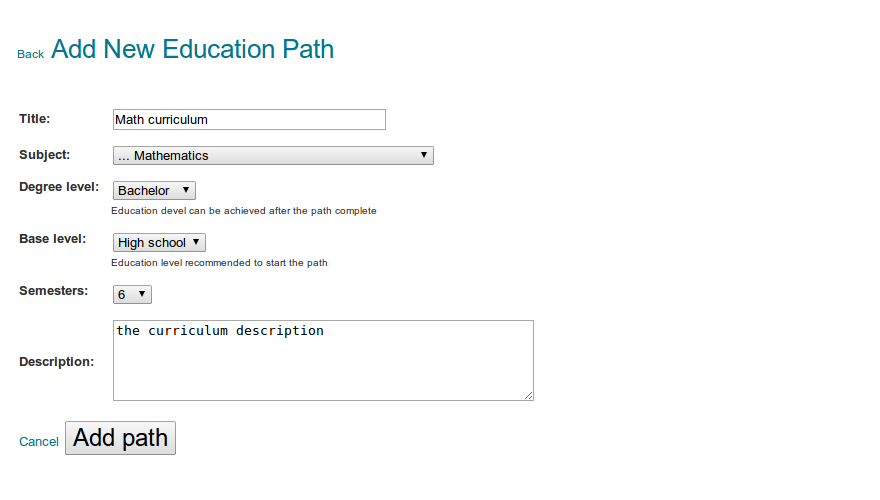
Then click the "Add path" button to save your new path.
5. Create the curriculum. Add courses to semesters.
Click the "+ Add" button to add new Course or Alternative Group or Electives Group.
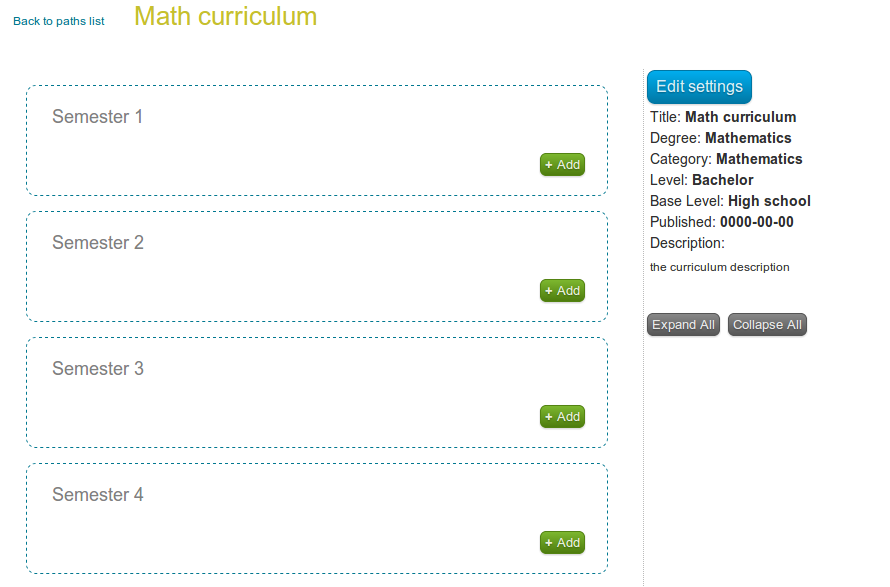
When you click "+ Add" button you will have to choose what type of a record do you want to add:
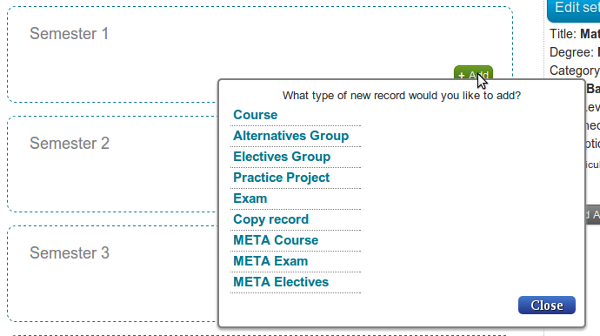
Course - add new course to the curriculum;
Alternatives Group - if there are 2 or more courses for same subject from different providers then you can use Alternatives Group to add all of such courses. When a student will apply a path to his personal education path he will have to choose what course from alternatives to study;
Electives Group - this is group of courses for different subjects. A student will have to choose 1 or more courses from a group when apply a curriculum as his personal education path;
6. Publish your curriculum once it is ready.
Click the link "Back to Paths list". And then you will see the button to publich the Path:
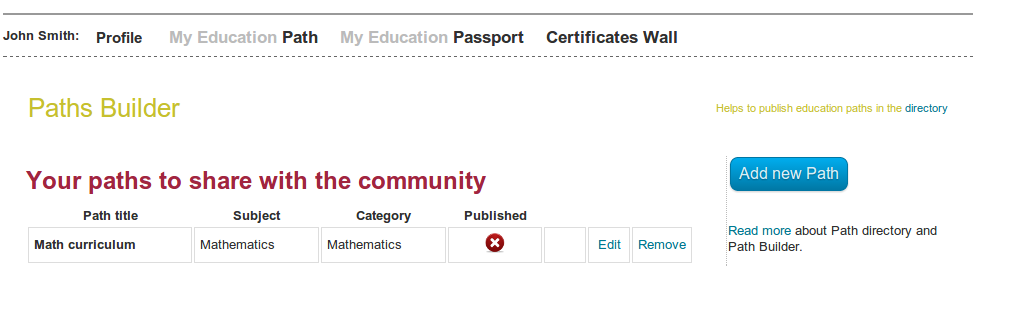
After publishing the curriculum will be visible in the Paths directory.